Part 4: Cost-Optimized Architectures
FCJ Cost Optimization Focus: This section covers AWS cost optimization strategies essential for the FCJ midterm. Understanding NAT Gateway pricing, S3 storage classes, and lifecycle policies is critical.
This section covers the cost optimization pillar of the AWS Well-Architected Framework, running systems to deliver business value at the lowest price point.
Cost Optimization Principles
Cost Optimization is the ability to run systems to deliver business value at the lowest price point while meeting your business objectives.
Key Principles:
- Practice Cloud Financial Management: Establish cost awareness
- Adopt a consumption model: Pay only for what you use
- Measure overall efficiency: Monitor and improve cost per outcome
- Stop spending money on undifferentiated heavy lifting: Use managed services
- Analyze and attribute expenditure: Know where money goes
AWS Cost Explorer - Cost Analysis & Optimization
AWS Cost Explorer is a built-in tool for visualizing, understanding, and managing AWS costs and usage over time.
Cost Explorer Features
┌────────────────────────────────────────────────────────────┐
│                     Data Sources                           │
├────────────────────────────────────────────────────────────┤
│ • EC2 Instances          • VPC/NAT Gateway                 │
│ • S3 Storage             • CloudFront CDN                  │
│ • RDS Databases          • DynamoDB                        │
│ • Lambda Functions       • EBS Volumes                     │
│ • Data Transfer          • Support Plans                   │
└──────────────────────────┬─────────────────────────────────┘
                           ↓
┌────────────────────────────────────────────────────────────┐
│                   Cost Explorer                            │
├────────────────────────────────────────────────────────────┤
│ 1. Cost Breakdown                                          │
│    • Group by: Service, Account, Tag, Region              │
│    • Views: Daily, Weekly, Monthly                        │
│    • Interactive charts, Export to CSV                    │
│                                                            │
│ 2. ML-Based Cost Forecasting                              │
│    • Predict costs 3-12 months ahead                      │
│    • Historical pattern analysis                          │
│    • Confidence intervals for budget planning             │
│                                                            │
│ 3. Advanced Filtering                                      │
│    • Filter by service, region, AZ, tag                   │
│    • Linked account filtering                             │
│    • Instance type/purchase option                        │
│    • Time range selection, Save custom filters            │
│                                                            │
│ 4. Rightsizing Recommendations                            │
│    • Underutilized EC2 detection                          │
│    • Downsize recommendations                             │
│    • Estimated savings $/month                            │
│    • CPU/Memory utilization trends                        │
│    • Idle resource identification                         │
│    • Instance family suggestions                          │
│                                                            │
│ 5. Cost Anomaly Detection                                  │
│    • ML-powered unusual spend detection                   │
│    • Automatic alerts (SNS/Email)                         │
│    • Root cause analysis                                  │
│    • Drill down to specific services/resources            │
│    • Historical comparison                                │
│    • False positive filtering                             │
└──────────────────────────┬─────────────────────────────────┘
                           ↓
┌────────────────────────────────────────────────────────────┐
│                  Actions & Outputs                         │
├────────────────────────────────────────────────────────────┤
│ 1. AWS Budgets                                             │
│    • Set cost/usage thresholds                            │
│    • Email/SNS alerts                                      │
│    • Auto-actions (stop EC2)                              │
│    • First 2 budgets FREE, $0.02/day after                │
│                                                            │
│ 2. Saved Reports                                           │
│    • Save custom views                                     │
│    • Scheduled reports                                     │
│    • Share with team                                       │
│    • S3 export integration                                │
│                                                            │
│ 3. Savings Plans Recommendations                           │
│    • Reserved Instance purchase suggestions               │
│    • Savings Plans recommendations                        │
│    • RI utilization tracking                              │
│    • RI coverage analysis                                 │
│    • Estimated savings percentage                         │
│                                                            │
│ 4. Programmatic Access                                     │
│    • Cost Explorer API                                     │
│    • AWS CLI integration                                   │
│    • Python boto3 SDK                                      │
│    • Custom dashboards, QuickSight                        │
└────────────────────────────────────────────────────────────┘
Cost Explorer Pricing
Cost Explorer: FREE in AWS account
Additional Costs:
- Hourly/resource-level granularity: Additional cost
- API calls: $0.01 per request
- AWS Budgets: First 2 budgets FREE, $0.02/day per budget after
Cost Optimization Best Practices
- Review Cost Explorer weekly - Catch cost spikes early
- Set up budgets with alerts - Proactive cost management
- Enable cost allocation tags - Track costs by project/team/environment
- Act on rightsizing recommendations - Eliminate waste
- Use forecasting for budget planning - Anticipate future costs
Cost Allocation Tags
Tags enable tracking costs by:
- Project: Project-A, Project-B
- Environment: Dev, Staging, Production
- Department: Engineering, Marketing, Sales
- Owner: john@example.com
Tag Strategy:
- Mandatory tags enforced via AWS Config
- Consistent naming conventions
- Tag-based budgets and alerts
- Chargeback/showback to departments
S3 Storage Tiering - Lifecycle Automated Cost Optimization
S3 Storage Classes - Complete Comparison
| Storage Class | Cost/GB-month | Retrieval Time | Retrieval Cost | Min Storage | Use Case | Availability | Durability |
|---|---|---|---|---|---|---|---|
| S3 Standard | $0.023 | Instant (ms) | None | None | Frequent access | 99.99% | 11 9’s |
| Intelligent-Tiering | $0.023 + $0.0025 | Instant (ms) | None | None | Unknown patterns | 99.9% | 11 9’s |
| Standard-IA | $0.0125 (46% ↓) | Instant (ms) | $0.01/GB | 30 days | <1 access/month | 99.9% | 11 9’s |
| One Zone-IA | $0.01 (57% ↓) | Instant (ms) | $0.01/GB | 30 days | Non-critical data | 99.5% | 11 9’s |
| Glacier Instant | $0.004 (83% ↓) | Milliseconds | $0.03/GB | 90 days | Quarterly access | 99.9% | 11 9’s |
| Glacier Flexible | $0.0036 (84% ↓) | 1-5 min to 12h | $0.0025-$0.03 | 90 days | 1-2 times/year | 99.99% | 11 9’s |
| Glacier Deep Archive | $0.00099 (96% ↓) | 12-48 hours | $0.0025-$0.02 | 180 days | Compliance/7yr | 99.99% | 11 9’s |
Glacier Flexible Retrieval Options
| Retrieval Tier | Time | Cost/GB | Use Case |
|---|---|---|---|
| Expedited | 1-5 minutes | $0.03 | Urgent access needed |
| Standard | 3-5 hours | $0.01 | Normal retrieval |
| Bulk | 5-12 hours | $0.0025 | Large datasets, cheapest |
Glacier Deep Archive Retrieval Options
| Retrieval Tier | Time | Cost/GB | Use Case |
|---|---|---|---|
| Standard | 12 hours | $0.02 | Normal compliance retrieval |
| Bulk | 48 hours | $0.0025 | Lowest cost, no urgency |
Lifecycle Policy Configuration
Lifecycle Rules automatically transition objects between storage classes and expire objects.
Example Lifecycle Policy:
Day 0 → S3 Standard
  $0.023/GB-month
  Frequent access (active data)
  ↓
Day 30 → S3 Standard-IA
  $0.0125/GB-month (46% cheaper)
  Min size: 128 KB
  Filter: prefix 'backups/', tag 'Archive=true'
  ↓
Day 90 → S3 Glacier Instant Retrieval
  $0.004/GB-month (83% cheaper)
  Quarterly accessed data (medical records, reports)
  Instant retrieval when needed
  ↓
Day 180 → S3 Glacier Flexible Retrieval
  $0.0036/GB-month (84% cheaper)
  1-2 times/year access acceptable
  Retrieval: 3-5 hours standard
  ↓
Day 365 → S3 Glacier Deep Archive
  $0.00099/GB-month (96% cheaper!)
  Compliance, regulatory, long-term retention
  Lowest cost storage option
  ↓
Day 2555 (7 years) → Delete (Expiration)
  Automatic deletion for compliance
  FREE operation (no delete charges)
Cost Savings Example - 1 TB Data
Without Lifecycle Optimization (S3 Standard for 1 year):
- 1 TB = 1024 GB
- Cost: 1024 GB × $0.023/GB × 12 months = $282.62/year
With Lifecycle Optimization:
| Period | Storage Class | Cost Calculation |
|---|---|---|
| Month 1 | Standard | 1024 × $0.023 × 1 = $23.55 |
| Months 2-3 | Standard-IA | 1024 × $0.0125 × 2 = $25.60 |
| Months 4-6 | Glacier Instant | 1024 × $0.004 × 3 = $12.29 |
| Months 7-12 | Glacier Flexible | 1024 × $0.0036 × 6 = $22.12 |
| Total | $83.56/year |
Annual Savings: $282.62 - $83.56 = $199.06 (70% reduction!)
5-Year Savings: $995.30 for just 1 TB of data
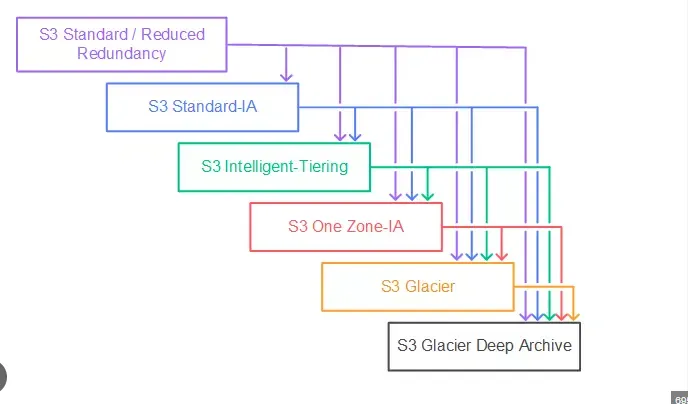
S3 Intelligent-Tiering
How It Works:
- Automatic optimization based on access patterns
- No retrieval fees (unlike Standard-IA, Glacier)
- Set and forget - AWS moves objects automatically
Tiers in Intelligent-Tiering:
- Frequent Access: Objects accessed recently
- Infrequent Access: Not accessed 30+ days → Saves 40%
- Archive Instant Access: Not accessed 90+ days → Saves 68%
- Archive Access (optional): Not accessed 90-270+ days → Saves 71%
- Deep Archive Access (optional): Not accessed 180-730+ days → Saves 95%
Cost: $0.023/GB-month + $0.0025 per 1,000 objects (monitoring fee)
When to Use: Unknown or unpredictable access patterns
S3 Lifecycle Best Practices
- Use S3 Intelligent-Tiering for unknown access patterns
- Set lifecycle policies at bucket or prefix level
- Monitor transition costs - Per-object charges apply
- Minimum storage durations: 30d IA, 90d Glacier, 180d Deep
- Use S3 Storage Lens for visibility into storage usage
- Enable versioning for compliance and protection
- Tag objects for granular lifecycle management
- Test retrieval times before committing to Glacier
- Calculate ROI: (Current cost - New cost) vs Transition cost
Storage Lens
S3 Storage Lens provides organization-wide visibility into object storage usage.
Metrics:
- Storage by region, storage class, bucket
- Object count trends
- Encryption status
- Access patterns
Pricing: Free for 14 days of metrics, $0.20 per million objects monitored
Complete VPC Architecture with NAT Gateway
Multi-AZ VPC with Distributed NAT Gateways
VPC: 10.0.0.0/16 (65,536 IPs)

┌─────────────────────────────────────────────────────────────┐
│                     Internet Gateway                        │
│              (Single, HA, No bandwidth limit)               │
└─────────────────┬───────────────────────┬───────────────────┘
                  │                       │
    ┌─────────────▼────────────┐ ┌───────▼─────────────┐
    │  Availability Zone 1a    │ │  Availability Zone 1b│
    │ ┌──────────────────────┐ │ │ ┌──────────────────┐ │
    │ │ Public Subnet 1      │ │ │ │ Public Subnet 2  │ │
    │ │ 10.0.1.0/24          │ │ │ │ 10.0.2.0/24      │ │
    │ │                      │ │ │ │                  │ │
    │ │ ┌─────────────────┐  │ │ │ │ ┌──────────────┐ │ │
    │ │ │ NAT Gateway 1   │  │ │ │ │ │NAT Gateway 2 │ │ │
    │ │ │ EIP: 54.x.x.1   │  │ │ │ │ │EIP: 54.x.x.2 │ │ │
    │ │ │ $0.045/hour     │  │ │ │ │ │$0.045/hour   │ │ │
    │ │ └─────────────────┘  │ │ │ │ └──────────────┘ │ │
    │ │ ┌─────────────────┐  │ │ │ │ ┌──────────────┐ │ │
    │ │ │ Bastion Host    │  │ │ │ │ │ Bastion Host │ │ │
    │ │ │ Public IP       │  │ │ │ │ │ Public IP    │ │ │
    │ │ └─────────────────┘  │ │ │ │ └──────────────┘ │ │
    │ │ ┌─────────────────┐  │ │ │ │                  │ │
    │ │ │ ALB (Public)    │──┼─┼─┼─┼──────────────────┘ │
    │ │ └─────────────────┘  │ │ │ │                    │
    │ └──────────────────────┘ │ │ └────────────────────┘ │
    │           ↓              │ │          ↓             │
    │ ┌──────────────────────┐ │ │ ┌──────────────────┐  │
    │ │ Private Subnet 1     │ │ │ │ Private Subnet 2 │  │
    │ │ 10.0.3.0/24          │ │ │ │ 10.0.4.0/24      │  │
    │ │                      │ │ │ │                  │  │
    │ │ ┌────────┐┌────────┐ │ │ │ │ ┌────┐┌────┐    │  │
    │ │ │App Srv││App Srv│ │ │ │ │ │App ││App │    │  │
    │ │ │   1   ││   2   │ │ │ │ │ │Srv ││Srv │    │  │
    │ │ │No Pub ││No Pub │ │ │ │ │ │ 3  ││ 4  │    │  │
    │ │ │  IP   ││  IP   │ │ │ │ │ │    ││    │    │  │
    │ │ └────────┘└────────┘ │ │ │ │ └────┘└────┘    │  │
    │ │ ┌─────────────────┐  │ │ │ │ ┌──────────────┐ │  │
    │ │ │ RDS Primary     │  │ │ │ │ │ RDS Standby  │ │  │
    │ │ │ (Multi-AZ)      │──┼─┼─┼─┼─│ (Multi-AZ)   │ │  │
    │ │ └─────────────────┘  │ │ │ │ └──────────────┘ │  │
    │ │         ↑            │ │ │ │        ↑         │  │
    │ │    Route to NAT 1   │ │ │ │   Route to NAT 2 │  │
    │ └──────────────────────┘ │ │ └──────────────────┘  │
    └──────────────────────────┘ └───────────────────────┘
                  │                       │
                  └───────────┬───────────┘
                              ↓
                    ┌───────────────────┐
                    │ S3 Gateway        │
                    │ Endpoint (FREE)   │
                    │ Private connection│
                    │ to S3, no NAT cost│
                    └───────────────────┘
Route Tables Configuration
Public Route Table (both Public Subnets 1 & 2):
| Destination | Target | Purpose |
|---|---|---|
| 10.0.0.0/16 | local | Within VPC |
| 0.0.0.0/0 | Internet Gateway | Internet access |
Private Route Table - AZ-1a (Private Subnet 1):
| Destination | Target | Purpose |
|---|---|---|
| 10.0.0.0/16 | local | Within VPC |
| 0.0.0.0/0 | NAT Gateway 1 | Outbound internet via NAT in same AZ |
| S3 (pl-id) | Gateway Endpoint | FREE S3 access |
Private Route Table - AZ-1b (Private Subnet 2):
| Destination | Target | Purpose |
|---|---|---|
| 10.0.0.0/16 | local | Within VPC |
| 0.0.0.0/0 | NAT Gateway 2 | Outbound internet via NAT in same AZ |
| S3 (pl-id) | Gateway Endpoint | FREE S3 access |
AWS Best Practices (Official Recommendation)
High Availability:
✅ Deploy one NAT Gateway in EACH Availability Zone
- If one AZ fails, other AZs continue operating
- Each private subnet routes to NAT Gateway in same AZ
Cost Optimization:
✅ Route traffic within same AZ to avoid inter-AZ transfer fees
- Inter-AZ data transfer: $0.01/GB
- Keep traffic local when possible
✅ Use S3 Gateway Endpoint for S3 access (FREE!)
- No NAT Gateway charges for S3 traffic
- No data transfer charges
NAT Gateway Pricing (FCJ Midterm Important)
Hourly Charge: $0.045 per hour per NAT Gateway
- 2 NAT Gateways (Multi-AZ): $0.045 × 2 × 730 hours = $65.70/month
Data Processing: $0.045 per GB processed
- Example: 1 TB/month = 1024 GB × $0.045 = $45.60/month
Total Example Cost: ~$111.30/month (2 NAT GW + 1 TB data)
Elastic IP: Each NAT Gateway requires one Elastic IP (static public IP)
S3 Gateway Endpoint Cost Savings
Without S3 Gateway Endpoint:
- S3 traffic goes through NAT Gateway
- Costs: $0.045/hour NAT + $0.045/GB data processing
With S3 Gateway Endpoint:
- FREE - No hourly charge
- FREE - No data transfer fees
- Savings: ~100% vs NAT Gateway for S3 access
Best Practice: Always use S3 Gateway Endpoint for S3 access from private subnets
Inter-AZ Data Transfer Costs
Data Transfer Charges:
- Within same AZ: FREE
- Between AZs: $0.01/GB in each direction
Cost Optimization:
✅ Keep traffic in same AZ whenever possible
✅ Use local NAT Gateway (one per AZ) to avoid inter-AZ charges
✅ Design applications to minimize cross-AZ traffic
NAT Gateway Use Cases
Common Scenarios:
- Private app servers accessing internet for software updates
- Lambda functions in VPC calling external APIs
- RDS instances downloading patches from AWS
- Containerized apps pulling Docker images from DockerHub
- Private instances uploading logs to CloudWatch
- Backup solutions sending data to S3 (use S3 endpoint instead!)
- Private compute accessing AWS services via PrivateLink
VPC Architecture Pattern: Distributed NAT
Pattern: One NAT Gateway per Availability Zone
Benefits:
- ✅ High availability (AZ failure doesn’t affect other AZs)
- ✅ No inter-AZ data transfer charges
- ✅ Better performance (local routing)
- ✅ Fault isolation
Trade-off: Higher cost (multiple NAT Gateways)
Alternative: Single NAT Gateway (not recommended for production)
- Lower cost (~50% savings)
- Single point of failure
- Inter-AZ data transfer charges
Security Best Practices
Private Subnets:
- ✅ EC2 instances have NO public IPs
- ✅ Isolated from direct internet access
- ✅ NAT Gateway allows outbound only connections
- ✅ Internet cannot initiate connections to private instances
Bastion Hosts (Jump Boxes):
- In public subnet with public IP
- SSH/RDP gateway for accessing private instances
- Use Systems Manager Session Manager instead (more secure, no public IP needed)
Additional Cost Optimization Strategies
Reserved Instances and Savings Plans
Reserved Instances (RIs):
- Commitment: 1-year or 3-year
- Discount: Up to 72% vs On-Demand
- Payment: All Upfront, Partial Upfront, No Upfront
- Types: Standard RI (highest discount), Convertible RI (flexibility)
Compute Savings Plans:
- Commitment: $/hour for 1 or 3 years
- Discount: Up to 66% vs On-Demand
- Flexibility: Any instance family, region, OS, tenancy
- Applies to: EC2, Lambda, Fargate
EC2 Instance Savings Plans:
- Commitment: $/hour for specific instance family in region
- Discount: Up to 72% vs On-Demand
- Flexibility: Instance size, OS, tenancy
Spot Instances
Spot Instances: Up to 90% discount vs On-Demand
How It Works:
- Bid on spare EC2 capacity
- AWS can reclaim with 2-minute warning
- Price fluctuates based on supply/demand
Best For:
- Batch processing
- Data analysis
- Stateless workloads
- Fault-tolerant applications
Not For:
- Databases
- Stateful applications
- Critical workloads requiring 24/7 availability
Right-Sizing
Right-Sizing: Match instance types to actual usage
Common Waste:
- Oversized instances (t3.xlarge when t3.medium sufficient)
- Idle resources (running 24/7 when only needed 8 hours/day)
Tools:
- AWS Cost Explorer Rightsizing Recommendations
- AWS Compute Optimizer (ML-based recommendations)
- CloudWatch metrics analysis
FCJ Midterm Preparation Tips for Cost-Optimized Architectures
- S3 Glacier Deep Archive: Cheapest storage ($0.00099/GB), 96% cheaper than Standard
- NAT Gateway: $0.045/hour + $0.045/GB, deploy one per AZ for HA
- S3 Gateway Endpoint: FREE for S3 access, avoid NAT charges
- Inter-AZ data transfer: $0.01/GB, keep traffic in same AZ
- S3 Intelligent-Tiering: Automatic optimization, no retrieval fees, $0.0025 per 1000 objects
- Cost Explorer: FREE, API calls $0.01 per request
- AWS Budgets: First 2 FREE, $0.02/day after
- Lifecycle policies: Minimum storage durations (30d IA, 90d Glacier, 180d Deep)