AWS Service Fundamentals
Overview
This section covers the core fundamentals of major AWS services that form the foundation of cloud architecture. Understanding these services is essential for the FCJ (First Cloud Journey) Midterm Exam.
FCJ Workshop Practice: Each service below has corresponding hands-on workshops at cloudjourney.awsstudygroup.com. Complete these workshops for practical experience!
Core AWS Services Covered
- EC2 - Elastic Compute Cloud (Virtual Servers) - FCJ Workshop (000004)
- S3 - Simple Storage Service (Object Storage)
- IAM - Identity and Access Management (Security & Permissions) - FCJ Workshop (000002)
- RDS - Relational Database Service (Managed Databases) - FCJ Workshop (000005)
- VPC - Virtual Private Cloud (Network Isolation) - FCJ Workshop (000003)
- Lambda - Serverless Compute Functions
- CloudWatch - Monitoring and Observability
- CloudFront - Content Delivery Network (CDN)
These services are the building blocks of AWS architectures and appear frequently in FCJ midterm scenarios.
Amazon EC2 (Elastic Compute Cloud)
FCJ Reference: Practice hands-on with EC2 Workshop (000004) - Windows Server 2022, Amazon Linux 2023, Security Groups, and cost governance.
What is EC2?
Amazon EC2 provides resizable virtual servers (instances) in the cloud. It’s the fundamental compute service in AWS.
EC2 Instance Types (FCJ Midterm Critical)
| Family | Name | Use Case | Example |
|---|---|---|---|
| General Purpose | T3, T3a, M6i | Balanced CPU/Memory | Web servers, small databases |
| Compute Optimized | C6i, C7g | High CPU | Batch processing, gaming servers |
| Memory Optimized | R6i, X2idn | High RAM | Large databases, caching |
| Storage Optimized | I4i, D3 | High IOPS, throughput | Data warehouses, NoSQL |
| Accelerated Computing | P4, G5 | GPU workloads | Machine learning, graphics |
EC2 Pricing Models
1. On-Demand (Pay-As-You-Go):
- No upfront commitment
- Highest cost per hour
- Use case: Short-term, unpredictable workloads
2. Reserved Instances (1 or 3 years):
- Up to 75% discount vs On-Demand
- Standard RI: Fixed instance type
- Convertible RI: Can change instance type (54% discount)
- Use case: Steady-state, predictable workloads
3. Savings Plans (1 or 3 years):
- Up to 72% discount
- Flexible across instance families, regions, OS
- Use case: Flexible, long-term commitments
4. Spot Instances (Bid for unused capacity):
- Up to 90% discount
- Can be interrupted with 2-minute warning
- Use case: Fault-tolerant, flexible workloads (batch jobs)
5. Dedicated Hosts:
- Physical server dedicated to your use
- Compliance requirements (BYOL - Bring Your Own License)
- Most expensive option
6. Dedicated Instances:
- Instances run on hardware dedicated to single customer
- May share hardware with other instances in same account
EC2 Instance Lifecycle
┌─────────────┐
│   Pending   │ ← Launch instance
└──────┬──────┘
       │
       ▼
┌─────────────┐    Stop    ┌─────────────┐
│   Running   │◄─────────►│   Stopped   │
└──────┬──────┘            └──────┬──────┘
       │                          │
       │ Terminate                │ Terminate
       ▼                          ▼
┌─────────────┐            ┌─────────────┐
│ Terminating │───────────►│ Terminated  │
└─────────────┘            └─────────────┘

Billing: Only charged when instance is in "Running" state
Stop/Start: EBS-backed instances retain data, Instance Store lost
EC2 Storage Options
1. EBS (Elastic Block Store) - Persistent:
- Network-attached storage with 99.999% availability
- Survives instance stop/start
- Snapshots to S3 for backup
- Volume Types:
- gp3 (General Purpose SSD): Baseline 3,000 IOPS, $9.60/100GB - Recommended for dev environments (FCJ Workshop 000004)
- gp2 (General Purpose SSD): 300 baseline IOPS, $12/100GB - Consider upgrading to gp3 for cost savings
- io2 (Provisioned IOPS SSD): Up to 64,000 IOPS, mission-critical workloads
- st1 (Throughput Optimized HDD): Big data, data warehouses
- sc1 (Cold HDD): Lowest cost for infrequently accessed data
2. Instance Store - Ephemeral:
- Physically attached to host
- Highest IOPS (millions)
- Data lost on stop/termination
- FREE (included in instance cost)
3. EFS (Elastic File System) - Shared:
- Network file system (NFS)
- Shared across multiple EC2 instances
- Linux only
- Automatic scaling
EC2 Security Groups
Security Groups = Virtual firewall for EC2 instances
Key Characteristics:
- Stateful: Return traffic automatically allowed
- Allow rules only: Cannot create deny rules (use NACLs)
- Default: All inbound DENIED, all outbound ALLOWED
- Changes: Apply immediately
- Multiple: Can attach multiple SGs to one instance
Example Security Group:
Inbound Rules:
- HTTP (80) from 0.0.0.0/0 (anywhere)
- HTTPS (443) from 0.0.0.0/0
- SSH (22) from 203.0.113.0/24 (corporate network only)

Outbound Rules:
- All traffic to 0.0.0.0/0 (default)
EC2 Placement Groups
1. Cluster - Low latency:
- Same AZ, close physical proximity
- 10 Gbps network between instances
- Use case: HPC (High Performance Computing), big data
2. Spread - High availability:
- Different hardware racks
- Max 7 instances per AZ per group
- Use case: Critical applications
3. Partition - Large distributed systems:
- Up to 7 partitions per AZ
- Each partition on separate hardware
- Use case: Hadoop, Cassandra, Kafka
EC2 User Data
EC2 User Data = Script that runs at instance first launch
#!/bin/bash
# Update system
yum update -y

# Install Apache web server
yum install -y httpd
systemctl start httpd
systemctl enable httpd

# Create simple webpage
echo "<h1>Hello from $(hostname -f)</h1>" > /var/www/html/index.html
Runs as: root user
When: Only at first boot (unless configured otherwise)
Use case: Automate instance configuration
EC2 Key Concepts for FCJ Midterm
✅ AMI (Amazon Machine Image): Template for EC2 instances (OS + software)
✅ Elastic IP: Static public IPv4 address (persists across stop/start)
✅ ENI (Elastic Network Interface): Virtual network card
✅ Instance Metadata: http://169.254.169.254/latest/meta-data/
✅ Tenancy: Default (shared hardware) vs Dedicated
Amazon S3 (Simple Storage Service)
What is S3?
Amazon S3 is object storage built to store and retrieve any amount of data from anywhere. It’s one of the oldest and most used AWS services.
S3 Core Concepts
Bucket:
- Container for objects
- Globally unique name
- Regional service (data stays in chosen region)
Object:
- File stored in bucket
- Consists of: Key (name), Value (data), Metadata, Version ID
- Max size: 5 TB per object
- Multipart upload required for files > 5 GB
Key (Object name):
- Full path to object
- Example:
s3://my-bucket/folder/subfolder/file.txt - No actual folders (flat structure with prefixes)
S3 Storage Classes (FCJ Midterm Critical)
| Storage Class | Use Case | Availability | Min Duration | Retrieval |
|---|---|---|---|---|
| S3 Standard | Frequent access | 99.99% | None | Immediate |
| S3 Intelligent-Tiering | Unknown/changing access | 99.9% | 30 days | Immediate |
| S3 Standard-IA | Infrequent access | 99.9% | 30 days | Immediate |
| S3 One Zone-IA | Non-critical, infrequent | 99.5% | 30 days | Immediate |
| S3 Glacier Instant | Archive, instant access | 99.9% | 90 days | Milliseconds |
| S3 Glacier Flexible | Archive, 1-5 min retrieval | 99.99% | 90 days | Minutes-hours |
| S3 Glacier Deep Archive | Long-term archive (7-10 yrs) | 99.99% | 180 days | 12-48 hours |
Pricing (US East):
- Standard: $0.023/GB
- Standard-IA: $0.0125/GB (+ $0.01/GB retrieval)
- One Zone-IA: $0.01/GB
- Glacier Instant Retrieval: $0.004/GB (68% savings vs Standard-IA, millisecond access)
- Glacier Deep Archive: $0.00099/GB (cheapest - 96% savings vs Standard)
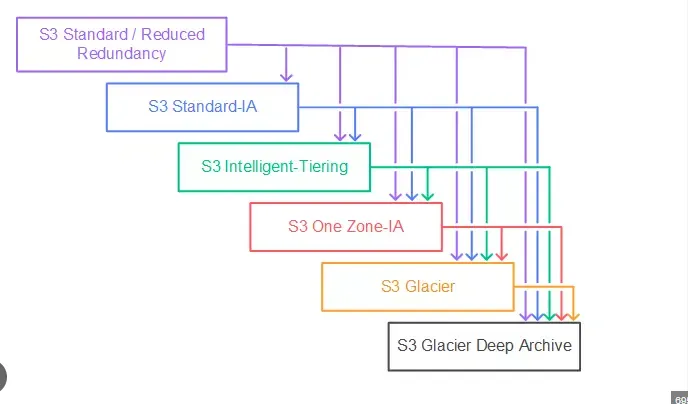
S3 Intelligent-Tiering: Automatic cost optimization with $0.0025 per 1,000 objects monthly monitoring fee. Objects automatically move between access tiers: Frequent (< 30 days), Infrequent (30-90 days), Archive Instant (90-365 days), Archive (365+ days). No retrieval fees. Ideal when access patterns are unpredictable.
S3 Versioning
Purpose: Keep multiple versions of an object
States:
- Unversioned (default)
- Versioning-enabled
- Versioning-suspended
Key Points:
- Once enabled, cannot be disabled (only suspended)
- Each version has unique Version ID
- Delete creates “delete marker” (can be removed to restore)
- Protects against accidental deletion
S3 Replication
Cross-Region Replication (CRR):
- Copy objects across AWS regions
- Use case: Compliance, lower latency, disaster recovery
Same-Region Replication (SRR):
- Copy objects within same region
- Use case: Log aggregation, live replication between accounts
Requirements:
- Versioning must be enabled on both source and destination
- Proper IAM permissions
- Only new objects replicated (not existing)
- Can replicate delete markers (optional)
S3 Lifecycle Policies
Automate transition between storage classes and deletion
Transition Actions:
S3 Standard (Day 0)
    ↓ (30 days)
S3 Standard-IA
    ↓ (60 days)
S3 Glacier Flexible Retrieval
    ↓ (365 days)
S3 Glacier Deep Archive
    ↓ (2555 days / 7 years)
Delete
Example Policy:
{
  "Rules": [{
    "Id": "Archive old logs",
    "Status": "Enabled",
    "Filter": { "Prefix": "logs/" },
    "Transitions": [
      { "Days": 30, "StorageClass": "STANDARD_IA" },
      { "Days": 90, "StorageClass": "GLACIER" }
    ],
    "Expiration": { "Days": 365 }
  }]
}
S3 Security
Bucket Policies (Resource-based):
{
  "Version": "2012-10-17",
  "Statement": [{
    "Sid": "PublicRead",
    "Effect": "Allow",
    "Principal": "*",
    "Action": "s3:GetObject",
    "Resource": "arn:aws:s3:::my-bucket/*"
  }]
}
Access Control:
- Bucket policies (JSON)
- IAM policies (user/role-based)
- ACLs (legacy, not recommended)
- Block Public Access settings (account/bucket level)
Encryption:
- SSE-S3: S3-managed keys (AES-256)
- SSE-KMS: AWS KMS managed keys (audit trail)
- SSE-C: Customer-provided keys
- Client-side: Encrypt before upload
S3 Performance
Request Rates:
- 3,500 PUT/COPY/POST/DELETE per second per prefix
- 5,500 GET/HEAD per second per prefix
- No limit on prefixes
Transfer Acceleration:
- Use CloudFront edge locations
- Up to 50-500% faster uploads
- Format:
bucket-name.s3-accelerate.amazonaws.com
Multipart Upload:
- Required for files > 5 GB
- Recommended for files > 100 MB
- Parallel uploads
- Can resume failed uploads
S3 Static Website Hosting
Enable static website hosting on bucket
Requirements:
- Bucket name must match domain (optional)
- Objects must be publicly accessible
- Index document (e.g., index.html)
- Error document (optional, e.g., error.html)
URL Format:
http://bucket-name.s3-website-region.amazonaws.com
http://bucket-name.s3-website.region.amazonaws.com
Use case: Host static websites (HTML, CSS, JS, images)
AWS IAM (Identity and Access Management)
What is IAM?
AWS IAM allows you to securely control access to AWS services and resources. It’s a global service (not region-specific).
IAM Core Components
1. Users:
- Individual person or application
- Long-term credentials (password, access keys)
- Can belong to multiple groups
- Max: 5,000 users per AWS account
2. Groups:
- Collection of users
- Apply policies to multiple users
- Cannot nest groups
- User can belong to multiple groups (max 10)
3. Roles:
- Temporary credentials via STS (Security Token Service)
- No password or access keys
- Can be assumed by users, services, or applications
- Use case: EC2 accessing S3, cross-account access
4. Policies:
- JSON document defining permissions
- Attached to users, groups, or roles
IAM Policy Structure
{
  "Version": "2012-10-17",
  "Statement": [
    {
      "Sid": "AllowS3ReadAccess",
      "Effect": "Allow",
      "Action": [
        "s3:GetObject",
        "s3:ListBucket"
      ],
      "Resource": [
        "arn:aws:s3:::my-bucket",
        "arn:aws:s3:::my-bucket/*"
      ],
      "Condition": {
        "IpAddress": {
          "aws:SourceIp": "203.0.113.0/24"
        }
      }
    }
  ]
}
Components:
- Version: Policy language version (always “2012-10-17”)
- Statement: One or more permissions
- Sid: Statement ID (optional, descriptive)
- Effect: Allow or Deny
- Action: List of allowed/denied actions
- Resource: ARN of resources
- Condition: Optional conditions (IP, MFA, time, etc.)
IAM Policy Types
1. AWS Managed Policies:
- Created and managed by AWS
- Updated by AWS
- Example:
AdministratorAccess,ReadOnlyAccess
2. Customer Managed Policies:
- Created by you
- Reusable across users/groups/roles
- Version control
3. Inline Policies:
- Directly attached to single user/group/role
- 1:1 relationship
- Deleted when entity is deleted
IAM Policy Evaluation Logic (FCJ Midterm Critical)
Policy Evaluation Order - “DAD” Rule: Understanding how AWS evaluates policies is critical for the FCJ midterm!
When an IAM entity attempts an action, AWS evaluates policies in this order:
1. Explicit Deny → Always wins (overrides everything)
2. Explicit Allow → Required for access
3. Implicit Deny → Default when no explicit allow exists
Decision Flow:
Request Made
    ↓
Is there an EXPLICIT DENY? → YES → ❌ ACCESS DENIED
    ↓ NO
Is there an EXPLICIT ALLOW? → YES → ✅ ACCESS GRANTED
    ↓ NO
❌ ACCESS DENIED (implicit deny)
Key Points:
- By default, all requests are implicitly denied
- An explicit deny in ANY policy overrides ALL allows
- Must have explicit allow AND no explicit deny to grant access
- This is why it’s called the “DAD” rule: Deny → Allow → Deny (implicit)
Example: If one policy allows s3:PutObject and another policy denies s3:*, the deny wins and the user cannot put objects.
IAM Best Practices
✅ Enable MFA for root account and privileged users
✅ Use roles for applications running on EC2 (see FCJ Workshop 000048)
✅ Principle of Least Privilege: Grant minimum permissions needed (see FCJ Workshop 000002)
✅ Use groups to assign permissions to users
✅ Rotate credentials regularly (max 90 days recommended)
✅ Enable CloudTrail for audit logging
✅ Use policy conditions for enhanced security (IP restrictions, MFA requirements)
✅ Never share root account credentials
✅ Use IAM Access Analyzer to generate least-privilege policies
IAM Access Keys
Access Keys = Long-term credentials for programmatic access (CLI, SDK, API)
Components:
- Access Key ID (public)
- Secret Access Key (private, shown once)
Security:
- Max 2 access keys per user
- Can be inactive/active/deleted
- Rotate regularly (90 days recommended)
- Never commit to code repositories
IAM Password Policy
Configure password requirements:
- Minimum length (6-128 characters)
- Require uppercase letters
- Require lowercase letters
- Require numbers
- Require symbols
- Allow users to change password
- Password expiration (e.g., 90 days)
- Prevent password reuse (e.g., last 5 passwords)
IAM Roles for EC2
Purpose: Grant EC2 instances permissions to access AWS services
How it works:
- Create IAM role with policies (e.g., S3 read access)
- Attach role to EC2 instance at launch (or later)
- Application uses AWS SDK/CLI automatically (no access keys needed)
- Instance retrieves temporary credentials from instance metadata
Benefits:
- No access keys to manage
- Automatic credential rotation
- Secure
IAM Cross-Account Access
Use case: Account A needs to access resources in Account B
Setup:
- Account B creates IAM role with trust policy allowing Account A
- Account A users assume role using STS AssumeRole
- Temporary credentials granted for access
Trust Policy (in Account B):
{
  "Version": "2012-10-17",
  "Statement": [{
    "Effect": "Allow",
    "Principal": {
      "AWS": "arn:aws:iam::111111111111:root"
    },
    "Action": "sts:AssumeRole"
  }]
}
Amazon RDS (Relational Database Service)
What is RDS?
Amazon RDS is a managed relational database service that handles routine database tasks (backups, patching, scaling).
Supported Database Engines
| Engine | Version Examples | Use Case |
|---|---|---|
| Amazon Aurora | MySQL 5.7/8.0, PostgreSQL 11-15 | High performance, cloud-native |
| MySQL | 5.7, 8.0 | Open-source, web apps |
| PostgreSQL | 11, 12, 13, 14, 15 | Advanced features, compliance |
| MariaDB | 10.5, 10.6 | MySQL fork, open-source |
| Oracle | 19c, 21c | Enterprise, legacy apps |
| SQL Server | 2016, 2017, 2019, 2022 | Microsoft ecosystem |
RDS Instance Types
General Purpose (gp3, gp2):
- Balanced price/performance
- 3,000 IOPS baseline (gp3)
- Use case: Most databases
Provisioned IOPS (io1, io2):
- Guaranteed IOPS (up to 256,000)
- Low latency
- Use case: I/O intensive workloads
RDS Storage Auto Scaling
Automatically increase storage when running low
Conditions:
- Free space < 10% of allocated storage
- Low-storage condition lasts at least 5 minutes
- At least 6 hours since last modification
Benefits:
- Avoid downtime
- No manual intervention
- Cost-effective
RDS Read Replicas
Purpose: Scale read operations, improve performance
Key Features:
- Up to 15 read replicas (Aurora: 15, others: 5)
- Asynchronous replication
- Can be in different regions
- Can be promoted to standalone database
Use Cases:
- Read-heavy workloads
- Reporting / analytics (offload from primary)
- Disaster recovery (promote replica)
Replication Lag: Usually milliseconds to seconds
RDS Multi-AZ Deployments
Purpose: High availability and disaster recovery
How it works:
- Synchronous replication to standby in different AZ
- Automatic failover (60-120 seconds)
- Single DNS endpoint (no application changes)
- No performance benefit (standby not accessible for reads)
FCJ Workshop 000005: Multi-AZ uses synchronous replication which means every write to the primary database is immediately replicated to the standby BEFORE the write is acknowledged. This ensures zero data loss (RPO = 0) during failover. In contrast, Read Replicas use asynchronous replication and may have replication lag of seconds to minutes.
When failover happens:
- Primary DB instance fails
- AZ outage
- DB instance reboot with failover
- Network connectivity loss
Multi-AZ vs Read Replicas:
| Feature | Multi-AZ | Read Replicas |
|---|---|---|
| Purpose | High availability | Scalability |
| Replication | Synchronous | Asynchronous |
| Standby accessible? | No | Yes (for reads) |
| Automatic failover | Yes | No (manual promote) |
| Same region | Yes | Can be cross-region |
| RPO | 0 (no data loss) | Minutes (replication lag) |
| RTO | 60-120 seconds | Hours (manual) |
RDS Backups
Automated Backups:
- Daily full snapshot
- Transaction logs every 5 minutes
- Retention: 1-35 days (default 7)
- Point-in-time recovery (PITR) to any second
- Stored in S3 (FREE within retention period)
Manual Snapshots:
- User-initiated
- Retention: Indefinite (until deleted)
- Can copy across regions
- Can share with other accounts
Restore:
- Creates new DB instance (new endpoint)
- Cannot restore to existing instance
RDS Encryption
At Rest:
- AWS KMS encryption
- Must be enabled at creation
- Cannot enable on existing unencrypted DB
- Includes backups, snapshots, replicas
In Transit:
- TLS/SSL connections
- Force SSL: Set
rds.force_ssl=1parameter
Encrypting Unencrypted DB:
- Create snapshot of unencrypted DB
- Copy snapshot with encryption enabled
- Restore from encrypted snapshot
- Update application endpoint
RDS Security
Network:
- Deploy in private subnet (no public IP)
- Security groups control inbound/outbound
- Cannot SSH into RDS instance (managed service)
Access Control:
- Master username/password
- IAM database authentication (MySQL, PostgreSQL)
- Integration with Secrets Manager for rotation
Auditing:
- CloudWatch Logs
- Enhanced Monitoring
- Performance Insights
RDS vs Aurora
| Feature | RDS (MySQL/PostgreSQL) | Aurora |
|---|---|---|
| Performance | Standard | 5x MySQL, 3x PostgreSQL |
| Storage | EBS (up to 64 TB) | Auto-scaling (up to 128 TB) |
| Replicas | 5 | 15 |
| Replication lag | Seconds | Milliseconds |
| Failover | 60-120 seconds | < 30 seconds |
| Backups | S3 | Continuous to S3 |
| Cost | Lower | Higher (20% more) |
Amazon VPC (Virtual Private Cloud)
What is VPC?
Amazon VPC is a logically isolated section of the AWS Cloud where you can launch AWS resources in a virtual network that you define.
VPC Core Components
1. VPC (Virtual Private Cloud):
- IPv4 CIDR block (e.g., 10.0.0.0/16)
- Region-specific
- Cannot change CIDR after creation (can add secondary)
2. Subnet:
- Subdivision of VPC CIDR
- AZ-specific
- Public subnet: Has route to Internet Gateway
- Private subnet: No route to Internet Gateway
3. Internet Gateway (IGW):
- Allows internet access from public subnets
- One IGW per VPC
- Horizontally scaled, redundant, highly available
4. NAT Gateway:
- Allows private subnets to access internet (outbound only)
- Deployed in public subnet
- Elastic IP required
- Pricing: $0.045/hour + $0.045/GB processed
5. Route Tables:
- Control traffic routing
- Each subnet associated with one route table
- Default route: 0.0.0.0/0 → IGW (public) or NAT Gateway (private)
VPC CIDR Blocks
Private IP Ranges (RFC 1918):
- 10.0.0.0/8 (10.0.0.0 - 10.255.255.255)
- 172.16.0.0/12 (172.16.0.0 - 172.31.255.255)
- 192.168.0.0/16 (192.168.0.0 - 192.168.255.255)
CIDR Notation Examples:
- /16 = 65,536 IP addresses
- /20 = 4,096 IP addresses
- /24 = 256 IP addresses
- /28 = 16 IP addresses
Reserved IPs (per subnet):
- First 4 IPs + last 1 IP reserved by AWS
- Example: 10.0.0.0/24
- 10.0.0.0: Network address
- 10.0.0.1: VPC router
- 10.0.0.2: DNS server
- 10.0.0.3: Future use
- 10.0.0.255: Broadcast (not supported in VPC)
VPC Architecture Example
┌─────────────────────────────────────────────────────────────┐
│                      VPC (10.0.0.0/16)                      │
│                                                             │
│  ┌──────────────────────────────────────────────────────┐  │
│  │             Availability Zone A                      │  │
│  │                                                      │  │
│  │  ┌──────────────────┐      ┌──────────────────┐    │  │
│  │  │ Public Subnet    │      │ Private Subnet   │    │  │
│  │  │ 10.0.1.0/24      │      │ 10.0.3.0/24      │    │  │
│  │  │                  │      │                  │    │  │
│  │  │ ┌──────────────┐ │      │ ┌──────────────┐ │    │  │
│  │  │ │   Web Server │ │      │ │   RDS MySQL  │ │    │  │
│  │  │ │   (EC2)      │─┼──────┼─│  (Primary)   │ │    │  │
│  │  │ └──────────────┘ │      │ └──────────────┘ │    │  │
│  │  │        │         │      │                  │    │  │
│  │  └────────┼─────────┘      └──────────────────┘    │  │
│  └───────────┼──────────────────────────────────────────┘  │
│              │                                             │
│  ┌───────────┼──────────────────────────────────────────┐  │
│  │           │     Availability Zone B                  │  │
│  │           │                                          │  │
│  │  ┌────────┼───────────┐      ┌──────────────────┐   │  │
│  │  │ Public │ Subnet    │      │ Private Subnet   │   │  │
│  │  │ 10.0.2.│/24        │      │ 10.0.4.0/24      │   │  │
│  │  │        │           │      │                  │   │  │
│  │  │ ┌──────▼─────────┐ │      │ ┌──────────────┐ │   │  │
│  │  │ │  NAT Gateway   │ │      │ │   RDS MySQL  │ │   │  │
│  │  │ │  (EIP)         │ │      │ │  (Standby)   │ │   │  │
│  │  │ └────────────────┘ │      │ └──────────────┘ │   │  │
│  │  │                    │      │                  │   │  │
│  │  └────────────────────┘      └──────────────────┘   │  │
│  └─────────────────────────────────────────────────────┘  │
│                                                            │
│  ┌────────────────────┐                                   │
│  │ Internet Gateway   │                                   │
│  └──────────┬─────────┘                                   │
└─────────────┼──────────────────────────────────────────────┘
              │
           Internet
Security Groups vs NACLs (FCJ Midterm Critical)
FCJ VPC Workshop: The VPC Workshop (000003) provides hands-on practice with Security Groups (stateful) and NACLs (stateless), including multi-tier architecture setups.
| Feature | Security Groups | Network ACLs |
|---|---|---|
| Level | Instance (ENI) | Subnet |
| State | Stateful (return traffic auto) | Stateless (must allow both) |
| Rules | Allow only | Allow and Deny |
| Rule Evaluation | All rules | Rules in order (1-32766) |
| Default | Deny all inbound, allow all outbound | Allow all inbound/outbound |
| Association | Multiple per instance | One per subnet |
Stateful vs Stateless Example:
Security Group (Stateful):
Inbound: Allow port 443 from 0.0.0.0/0
Outbound: Not needed - return traffic automatically allowed
NACL (Stateless):
Inbound: Allow port 443 from 0.0.0.0/0
Outbound: Must explicitly allow ephemeral ports (1024-65535) for return traffic
Key Point: With Security Groups, if you allow inbound HTTP (port 80), the response is automatically allowed back out. With NACLs, you must explicitly allow the outbound ephemeral ports for the return traffic.
VPC Peering
Purpose: Connect two VPCs privately using AWS network
Characteristics:
- Not transitive (A↔B, B↔C does NOT mean A↔C)
- Can peer across regions
- Can peer across accounts
- CIDR blocks must not overlap
- Update route tables in both VPCs
Use case: Connect VPCs for resource sharing
VPC Endpoints
Purpose: Privately connect VPC to AWS services without Internet Gateway
Types:
1. Gateway Endpoints (FREE):
- S3
- DynamoDB
- Route table entry
2. Interface Endpoints (Paid):
- Most AWS services (EC2, SNS, SQS, etc.)
- Powered by PrivateLink
- ENI with private IP in subnet
- Pricing: $0.01/hour + $0.01/GB
Benefits:
- No internet access required
- Lower latency
- More secure (traffic stays on AWS network)
VPC Flow Logs
Purpose: Capture IP traffic information
Levels:
- VPC level
- Subnet level
- ENI level
Destinations:
- CloudWatch Logs
- S3 bucket
Use cases:
- Troubleshoot connectivity issues
- Security analysis
- Monitor traffic patterns
Not captured:
- Traffic to Amazon DNS
- Traffic to 169.254.169.254 (instance metadata)
- DHCP traffic
- Traffic to VPC router
AWS Lambda
What is Lambda?
AWS Lambda lets you run code without provisioning or managing servers. You pay only for compute time consumed.
Lambda Core Concepts
Function:
- Code + configuration
- Runtime (Node.js, Python, Java, .NET, Go, Ruby, Custom)
- Handler: Entry point function
- Execution role: IAM role for permissions
Trigger (Event Source):
- API Gateway (HTTP requests)
- S3 (object upload)
- DynamoDB Streams (table changes)
- EventBridge (scheduled events)
- SQS (queue messages)
- SNS (notifications)
- Kinesis (streaming data)
Lambda Limits (FCJ Midterm Critical)
Hard Limits (Cannot be changed):
- Execution timeout: 15 minutes maximum
- Deployment package: 50 MB (zipped), 250 MB (unzipped)
- Environment variables: 4 KB total
- /tmp storage: 10 GB (ephemeral)
- Concurrent executions: 1,000 per region (default, can request increase)
Configurable:
- Memory: 128 MB to 10 GB (1 MB increments)
- Ephemeral storage (/tmp): 512 MB to 10 GB
- CPU: Scales proportionally with memory
- 1,769 MB memory = 1 vCPU
- 10,240 MB = ~6 vCPUs
Lambda Pricing (FCJ Midterm)
Request Pricing:
- $0.20 per 1 million requests
- First 1 million requests per month: FREE
Duration Pricing:
- $0.0000166667 per GB-second
- 400,000 GB-seconds per month: FREE
Example:
- Function: 512 MB, runs 100ms, invoked 10 million times/month
- Compute: 10M × 0.1s × 0.5GB = 500,000 GB-seconds
- Cost: (500,000 - 400,000) × $0.0000166667 = $1.67
- Requests: (10M - 1M) × $0.20/million = $1.80
- Total: $3.47/month
Lambda Execution Model
┌─────────────────────────────────────────────────────────┐
│                     Cold Start                          │
│                                                         │
│  1. Download code from S3                               │
│  2. Start execution environment (container)             │
│  3. Initialize runtime (Node.js, Python, etc.)          │
│  4. Run initialization code (outside handler)           │
│  5. Invoke handler function                             │
│                                                         │
│  Duration: 100ms - 2 seconds                            │
└─────────────────────────────────────────────────────────┘
                          │
                          ▼
┌─────────────────────────────────────────────────────────┐
│                    Warm Start                           │
│                                                         │
│  1. Reuse existing execution environment                │
│  2. Invoke handler function directly                    │
│                                                         │
│  Duration: ~10ms                                        │
└─────────────────────────────────────────────────────────┘
Cold Start Optimization Strategies:
- Use Provisioned Concurrency: Keeps functions pre-initialized and warm (eliminates cold starts but costs $0.015/GB-hour)
- Scheduled pings: Invoke function every 5-10 minutes to keep warm (free tier friendly)
- Minimize package size: Smaller deployment packages = faster initialization
- Initialize connections outside handler: Database connections, SDK clients initialize once per container
- Use ARM64 (Graviton2) processors: Better price-performance ratio
- Optimize dependencies: Only include necessary libraries
Important Note: With Provisioned Concurrency, cold starts still happen during initialization, but they occur BEFORE the function is invoked (not during user requests). The Init Duration in CloudWatch logs indicates a cold start, but with provisioned concurrency, this happens proactively.
Lambda Concurrency
Concurrency = Number of function instances running simultaneously
Types:
1. Unreserved Concurrency (Default):
- Shared pool (1,000 per region)
- Competing with other functions
2. Reserved Concurrency:
- Dedicated capacity for specific function
- Guarantees availability
- Limits maximum concurrent executions
3. Provisioned Concurrency:
- Pre-initialized instances (warm)
- Eliminates cold starts
- Pricing: $0.015 per GB-hour
- Use case: Latency-sensitive applications
Lambda Layers
Purpose: Share code and dependencies across functions
Characteristics:
- Max 5 layers per function
- Max 250 MB unzipped (including function + layers)
- Versioned and immutable
- Can be shared across accounts
Use cases:
- Common dependencies (libraries)
- Custom runtimes
- Configuration files
Example:
Function 1 ──┐
Function 2 ──┼──► Layer (Pandas, NumPy, Requests)
Function 3 ──┘
Lambda Environment Variables
Purpose: Configure function without changing code
Characteristics:
- Key-value pairs
- Max 4 KB total
- Can be encrypted with KMS
- Accessible in code via
process.env(Node.js) oros.environ(Python)
Example:
import os

DB_HOST = os.environ['DB_HOST']
DB_USER = os.environ['DB_USER']
Lambda Event Source Mapping
Synchronous (Request-Response):
- API Gateway
- ALB
- CloudFront (Lambda@Edge)
- SDK/CLI invocation
Asynchronous (Fire-and-Forget):
- S3
- SNS
- EventBridge
- CloudWatch Logs
- Retries: 2 automatic retries
- DLQ (Dead Letter Queue): Send failed events to SQS or SNS
Stream-Based (Poll-Based):
- DynamoDB Streams
- Kinesis Data Streams
- SQS
- Lambda polls source and invokes function with batch
- Retries until success or TTL expires
Lambda Security
Execution Role (IAM role):
- Permissions for Lambda to access AWS services
- Must have
lambda.amazonaws.comtrust relationship
Resource-Based Policy:
- Allows other services to invoke function
- Example: Allow S3 bucket to trigger function
VPC Integration:
- Lambda can access resources in VPC (RDS, ElastiCache)
- Requires ENI in VPC subnet
- Can access internet via NAT Gateway
Encryption:
- Environment variables encrypted at rest (KMS)
- Code signed with Code Signing
Lambda Best Practices
✅ Separate handler from core logic: Easier testing
✅ Use environment variables: Configuration without code changes
✅ Minimize deployment package: Faster cold starts
✅ Use Layers: Share dependencies
✅ Enable X-Ray: Distributed tracing
✅ Set appropriate timeout: Avoid hanging functions
✅ Use DLQ: Capture failed events
✅ Monitor with CloudWatch: Logs, metrics, alarms
Amazon CloudWatch
What is CloudWatch?
Amazon CloudWatch is a monitoring and observability service that provides data and actionable insights for AWS resources and applications.
CloudWatch Core Components
1. Metrics:
- Time-series data points
- Default metrics for AWS services (CPU, Network, Disk)
- Custom metrics (application-specific)
2. Logs:
- Collect and store log files
- Query with CloudWatch Logs Insights
- Export to S3, stream to Lambda, Kinesis
3. Alarms:
- Trigger actions based on metric thresholds
- Actions: SNS, Auto Scaling, EC2 action (stop, terminate)
4. Events (EventBridge):
- React to state changes in AWS services
- Schedule events (cron expressions)
5. Dashboards:
- Visualize metrics
- Customizable charts and graphs
CloudWatch Metrics
Default Metrics (no agent required):
- EC2: CPU utilization, Network in/out, Disk read/write
- EBS: Read/write ops, throughput
- RDS: Database connections, CPU, storage
- ELB: Request count, latency, HTTP codes
- S3: Bucket size, object count, requests
Custom Metrics (requires agent or SDK):
- EC2 memory utilization
- Disk space usage
- Application-specific metrics
- High-resolution metrics (1 second granularity)
Metric Resolution:
- Standard: 5 minutes (free for AWS services)
- Detailed: 1 minute (additional cost for EC2, ~$0.50/instance/month)
- High-resolution: 1 second (custom metrics, higher cost - $0.30 per custom metric)
Cost Optimization: For most workloads, 5-minute standard metrics are sufficient. Only enable 1-minute detailed monitoring for critical production instances that require faster response to metric changes.
CloudWatch Logs
Log Groups:
- Container for log streams
- Retention settings (1 day to 10 years, or indefinite)
Log Streams:
- Sequence of log events from same source
- Example: EC2 instance ID, Lambda function execution
Log Events:
- Record of activity
- Timestamp + message
Example:
Log Group: /aws/lambda/my-function
  └─ Log Stream: 2025/10/19/[$LATEST]abc123
      ├─ 2025-10-19T10:30:00 START RequestId: abc123
      ├─ 2025-10-19T10:30:01 Processing event...
      └─ 2025-10-19T10:30:02 END RequestId: abc123
CloudWatch Logs Insights
Purpose: Interactive query and analysis of log data
Query Example:
fields @timestamp, @message
| filter @message like /ERROR/
| stats count(*) by bin(5m)
| sort @timestamp desc
| limit 20
Use cases:
- Troubleshoot application errors
- Analyze performance trends
- Security investigations
CloudWatch Alarms
States:
- OK: Metric within threshold
- ALARM: Metric breached threshold
- INSUFFICIENT_DATA: Not enough data
Example Alarm:
Metric: EC2 CPU Utilization
Threshold: > 80%
Period: 5 minutes
Evaluation: 2 consecutive periods
Action: Send SNS notification to ops-team@example.com
Actions:
- SNS notification
- Auto Scaling action (add/remove instances)
- EC2 action (stop, terminate, reboot, recover)
- Systems Manager action
CloudWatch Agent
Purpose: Collect additional metrics and logs from EC2 and on-premises
Collects:
- Memory utilization
- Disk space usage
- Disk I/O
- Network metrics
- Process metrics
- Custom application logs
Installation:
# Download and install agent
wget https://s3.amazonaws.com/amazoncloudwatch-agent/linux/amd64/latest/amazon-cloudwatch-agent.rpm
sudo rpm -U ./amazon-cloudwatch-agent.rpm

# Configure agent
sudo /opt/aws/amazon-cloudwatch-agent/bin/amazon-cloudwatch-agent-config-wizard

# Start agent
sudo /opt/aws/amazon-cloudwatch-agent/bin/amazon-cloudwatch-agent-ctl \
  -a fetch-config \
  -m ec2 \
  -s \
  -c file:/opt/aws/amazon-cloudwatch-agent/config.json
CloudWatch Pricing
Metrics:
- First 10 custom metrics: FREE
- Additional custom metrics: $0.30/month per metric
- High-resolution: $0.30/month per metric
Logs:
- Ingestion: $0.50 per GB
- Storage: $0.03 per GB per month
- Insights queries: $0.005 per GB scanned
Alarms:
- Standard resolution: $0.10 per alarm per month
- High-resolution: $0.30 per alarm per month
Dashboards:
- First 3 dashboards: FREE (up to 50 metrics each)
- Additional dashboards: $3.00 per month per dashboard
CloudWatch vs CloudTrail vs Config
| Service | Purpose | What It Monitors |
|---|---|---|
| CloudWatch | Performance monitoring | Metrics, logs, application performance |
| CloudTrail | API activity logging | Who did what, when (audit trail) |
| Config | Resource configuration tracking | Configuration changes, compliance |
Example:
- CloudWatch: “EC2 CPU is at 95%”
- CloudTrail: “User john@example.com stopped EC2 instance i-123”
- Config: “Security group sg-456 was modified to allow port 22 from 0.0.0.0/0”
Amazon CloudFront
What is CloudFront?
Amazon CloudFront is a Content Delivery Network (CDN) that securely delivers data, videos, applications, and APIs globally with low latency and high transfer speeds.
CloudFront Core Concepts
Distribution:
- Configuration for content delivery
- Two types: Web (HTTP/HTTPS) and RTMP (Adobe Flash, deprecated)
Origin:
- Source of content
- S3 bucket, EC2, ALB, HTTP server, MediaStore, MediaPackage
Edge Location:
- Global network of data centers (450+ locations)
- Caches content close to users
Regional Edge Cache:
- Larger cache between origin and edge locations
- Reduces origin load
How CloudFront Works
┌──────────┐   1. Request    ┌──────────────┐
│   User   │───────────────→ │ Edge Location│
│  (Tokyo) │                 │   (Tokyo)    │
└──────────┘                 └──────┬───────┘
                                    │
                      Cache Miss?   │ 2. Cache Hit?
                                    ▼
                             ┌──────────────┐
                             │   Cached?    │
                             └──────┬───────┘
                                    │
                        NO          │         YES
        ┌───────────────────────────┼───────────────┐
        │                           │               │
        ▼                           │               ▼
┌──────────────┐                    │      ┌──────────────┐
│   Origin     │ 3. Fetch from      │      │ Return from  │
│ (S3 bucket   │    origin          │      │    cache     │
│  us-east-1)  │                    │      │              │
└──────┬───────┘                    │      └──────────────┘
       │                            │
       │ 4. Cache & return          │
       └────────────────────────────┘
CloudFront Origins
S3 Bucket:
- Static content (images, CSS, JS)
- Use Origin Access Control (OAC) for security
- Cannot have public bucket policy
Custom Origin (HTTP server):
- EC2 instances
- Application Load Balancer
- On-premises servers
- Any HTTP endpoint
Multiple Origins:
- Route based on path pattern
- Example:
/api/*→ ALB,/images/*→ S3
CloudFront Caching
Cache Key:
- URL path
- Query strings (optional)
- Headers (optional)
- Cookies (optional)
TTL (Time To Live):
- Minimum TTL: 0 seconds
- Maximum TTL: 31536000 seconds (1 year)
- Default TTL: 86400 seconds (24 hours)
- Control via
Cache-ControlorExpiresheaders
Cache Invalidation:
- Remove objects from cache before TTL expires
- Paths:
/images/*,/index.html,/*(all) - Cost: First 1,000 paths per month FREE, then $0.005 per path
Cost Optimization: Cache invalidations can be expensive at scale. Instead of invalidating /*, use versioned file names (e.g., style.v2.css, logo-2025.png) or query string versioning (e.g., style.css?v=2). This eliminates the need for invalidation—just update your references to the new version.
CloudFront Security
Origin Access Control (OAC):
- Restrict S3 access to CloudFront only
- S3 bucket policy allows CloudFront distribution
Signed URLs / Signed Cookies:
- Control who can access content
- Set expiration date/time
- Specify IP addresses
- Use case: Premium content, private files
Geo-Restriction:
- Whitelist: Allow specific countries
- Blacklist: Block specific countries
- Use case: Copyright, licensing
SSL/TLS:
- HTTPS only or redirect HTTP to HTTPS
- Custom SSL certificate (ACM or third-party)
- SNI (Server Name Indication) or dedicated IP
CloudFront Performance Features
HTTP/2 & HTTP/3:
- Enabled by default
- Multiplexing, server push
Compression:
- Gzip and Brotli compression
- Automatic for text files
Connection Reuse:
- Keep-alive connections to origin
Origin Shield:
- Additional caching layer
- Reduces load on origin
- Pricing: $0.01 per 10,000 requests
CloudFront Pricing
Data Transfer Out:
- First 10 TB: $0.085/GB (US/Europe)
- Next 40 TB: $0.080/GB
- Next 100 TB: $0.060/GB
- Over 150 TB: $0.050/GB
- FREE for transfer from AWS origins (S3, EC2, ELB)
HTTP/HTTPS Requests:
- $0.0075 per 10,000 requests (HTTP)
- $0.0100 per 10,000 requests (HTTPS)
Invalidation:
- First 1,000 paths per month: FREE
- Additional: $0.005 per path
CloudFront Use Cases
✅ Static Website Hosting:
- S3 bucket as origin
- Fast global delivery
✅ Dynamic Content Acceleration:
- ALB/EC2 as origin
- Optimize routing, keep-alive
✅ Video Streaming:
- On-demand (S3) or live (MediaStore)
- HLS, DASH, CMAF protocols
✅ API Acceleration:
- API Gateway as origin
- Reduce latency for global users
✅ Software Distribution:
- Download files (installers, updates)
- High transfer speeds
CloudFront vs S3 Transfer Acceleration
| Feature | CloudFront | S3 Transfer Acceleration |
|---|---|---|
| Purpose | Content delivery (caching) | Fast uploads to S3 |
| Direction | Download (origin → users) | Upload (users → S3) |
| Edge Locations | 450+ globally | Same edge locations |
| Caching | Yes | No |
| Use Case | Static websites, videos, APIs | Large file uploads |
Service Comparison Summary
Compute Options
| Service | Type | Use Case | Pricing Model |
|---|---|---|---|
| EC2 | Virtual servers | Full control, long-running | Per hour (On-Demand, Reserved, Spot) |
| Lambda | Serverless functions | Event-driven, short tasks | Per request + GB-second |
| Fargate | Serverless containers | Microservices, no server management | Per vCPU-second + GB-second |
Storage Options
| Service | Type | Use Case | Access Method |
|---|---|---|---|
| S3 | Object storage | Static files, backups, data lakes | HTTP API |
| EBS | Block storage | EC2 instance storage, databases | Attached to EC2 |
| EFS | File storage | Shared file system (Linux) | NFS mount |
Database Options
| Service | Type | Use Case | Management |
|---|---|---|---|
| RDS | Relational | Transactional workloads (OLTP) | Managed (backups, patching) |
| Aurora | Relational (cloud-native) | High performance, HA | Fully managed |
| DynamoDB | NoSQL (key-value) | Low latency, scalable | Fully managed, serverless |
Networking & Content Delivery
| Service | Purpose | Use Case |
|---|---|---|
| VPC | Network isolation | Create private networks in AWS |
| CloudFront | CDN | Fast content delivery globally |
| Route 53 | DNS | Domain registration, routing |
| ELB | Load balancing | Distribute traffic to EC2, containers |
Exam Tips - Service Fundamentals
EC2
✅ Know the 5 pricing models (On-Demand, Reserved, Spot, Dedicated)
✅ Security Groups are stateful, NACLs are stateless
✅ User Data runs once at first launch as root
✅ Instance Store data is lost on stop/termination
S3
✅ S3 Standard-IA requires 30-day minimum storage
✅ Glacier Deep Archive is cheapest ($0.00099/GB)
✅ Versioning cannot be disabled (only suspended)
✅ Lifecycle policies automate transitions
IAM
✅ IAM is global (not region-specific)
✅ Roles for temporary credentials, Users for long-term
✅ Use groups to assign permissions
✅ Enable MFA for root and privileged users
RDS
✅ Multi-AZ = High Availability (synchronous replication)
✅ Read Replicas = Scalability (asynchronous replication)
✅ Cannot SSH into RDS instance (managed service)
✅ Restore creates new DB instance
VPC
✅ VPC is region-specific, subnets are AZ-specific
✅ IGW for internet access (public subnets)
✅ NAT Gateway for private subnet internet access (outbound only)
✅ VPC Endpoints avoid internet traffic (S3, DynamoDB FREE)
Lambda
✅ 15-minute maximum execution timeout
✅ 10 GB memory maximum
✅ Cold start: 100ms-2s, Warm start: ~10ms
✅ Provisioned Concurrency eliminates cold starts
CloudWatch
✅ Default metrics: CPU, Network, Disk I/O
✅ Custom metrics: Memory, Disk space (requires agent)
✅ Logs Insights for querying log data
✅ Alarms trigger actions (SNS, Auto Scaling, EC2)
CloudFront
✅ CDN with 450+ edge locations
✅ Origin Access Control (OAC) for S3 security
✅ Signed URLs for restricted content
✅ First 1,000 invalidation paths FREE per month